
A privacy feature in WhatsApp allows users to hide their IP address during voice and video calls by routing calls in a way that helps prevent the other caller from seeing the user’s IP address. The setting is presented as an additional privacy measure, particularly for calls with people users do not know well.
Setting Designed to Protect IP Address During Calls
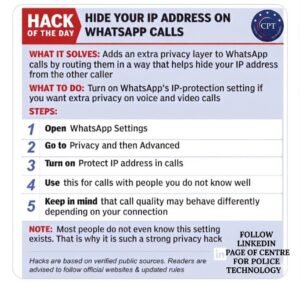
The feature is intended to add an extra layer of privacy to WhatsApp calls. According to the advisory shown in the screenshot, users can enable WhatsApp’s IP-protection setting if they want greater privacy while making voice or video calls.
FCRF Academy Launches Premier Anti-Money Laundering Certification Program
The advisory says the setting helps hide the user’s IP address from the other caller by changing the way calls are routed. It presents the feature as a useful privacy option for users concerned about exposing network-related information during calls.
Steps Listed for Enabling the Feature
Users are advised to open WhatsApp settings and go to the Privacy section, followed by Advanced. From there, they can turn on the option labelled “Protect IP address in calls.”
The advisory also suggests using this feature when speaking with people the user does not know well. It cautions that call quality may behave differently depending on the user’s connection.
Advisory Flags Low Awareness of Privacy Option
The screenshot notes that many users may not know this setting exists, describing it as a strong privacy measure. It also states that the guidance is based on verified public sources.
Readers are advised to follow official websites and updated rules while acting on such privacy guidance. The message places emphasis on user awareness and safer use of calling features on WhatsApp.