


Follow us on Google News

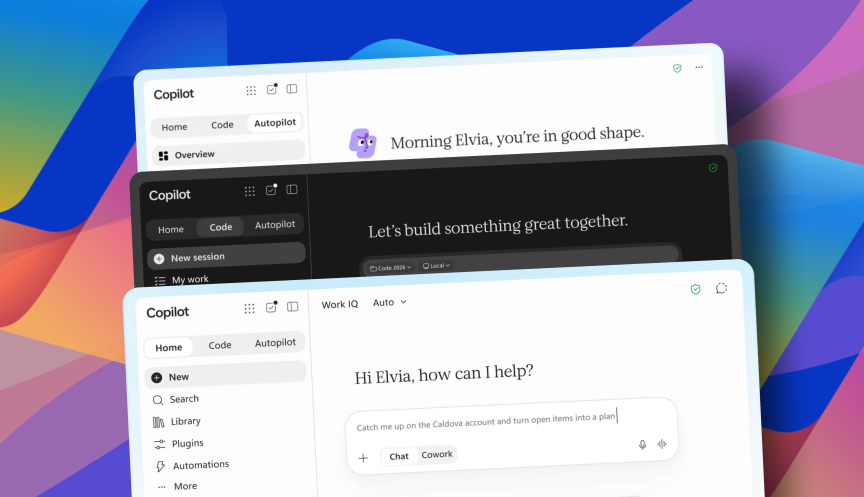
Microsoft has unveiled a major expansion of Copilot, adding natural-language software generation, an always-on AI agent and direct access to Word, Excel and PowerPoint inside the Copilot interface.
The changes are part of Microsoft’s attempt to turn Copilot from a standalone chatbot into a broader workplace platform capable of creating software, completing tasks and working across business applications.
Microsoft shares rose around 3% in early trading after the announcement.
https://the420.in/algoritha-security-cyber-crisis-drill-ttex-ccmp-readiness-banks/
Copilot Code will build software from natural-language instructions
One of the biggest additions is a tool called Code.
Microsoft says users will be able to describe what they want in ordinary language and have Copilot generate applications, dashboards and other software.
The tool uses technology related to GitHub Copilot, Microsoft’s coding assistant for developers.
The difference is that Code is being positioned for a broader group of business users who may not have conventional programming experience.
A user could, for example, describe an internal dashboard, workflow tool or small business application and ask Copilot to build it.
Code is scheduled to roll out to early-access customers at the end of September. Microsoft 365 Premium and Pro subscribers will receive preview access later this year.
This reflects a wider industry shift towards so-called vibe coding, where software is generated through natural-language prompts rather than written line by line.
Autopilot will operate as a digital coworker
Microsoft is also introducing Autopilot, a revamped version of the Scout AI agent it unveiled in June.
Unlike a normal chatbot that waits for each user request, Autopilot is designed to operate more continuously as what Microsoft describes as a digital coworker.
The agent will have its own identity within a company’s directory and can be assigned specific permissions.
That means organisations can decide what applications, files and business systems the agent is allowed to access.
Microsoft Corporate Vice President Annie Pearl said companies have struggled to deploy AI agents because of security, governance and compliance concerns. The company says Autopilot has been designed with those enterprise controls in mind.
The agent will enter private preview at the end of the month.
The shift is important because AI agents are increasingly being designed to act rather than simply answer questions.
Instead of only summarising a document, an agent could potentially gather information, update files, interact with other business applications and complete a multi-step workflow.
Word, Excel and PowerPoint move inside Copilot
Microsoft is also embedding its core Office applications directly within Copilot.
Users will be able to work with Word, Excel and PowerPoint without leaving the Copilot environment.
That could allow an employee to ask Copilot to analyse information, generate a spreadsheet, create a document and build a presentation within the same workflow.
Microsoft’s broader AI-at-work strategy is based on combining different AI models with the data and applications companies already use.
The company said this week that its enterprise platform will continue to support models from multiple providers, including OpenAI and Anthropic, rather than forcing customers to rely on a single model.
This multi-model approach allows businesses to select different AI systems depending on cost, reliability, safety or the type of task being performed.
Microsoft adds AI cost controls for companies
Another part of the update deals with the rising cost of workplace AI.
Microsoft is introducing tools that will allow employees and organisations to see more directly how much their AI usage is costing.
That addresses a growing problem for companies experimenting with AI agents.
Traditional software licences usually have predictable costs. AI tools can be different because expenses can increase with the number of requests, models used, amount of data processed and length of automated workflows.
An agent that works continuously across several applications can therefore generate much higher computing costs than an employee occasionally using a chatbot.
Microsoft’s new controls are intended to make those expenses more visible before large AI deployments create unexpected bills.
Copilot race moves from chatbots to agents
Microsoft is competing with OpenAI, Anthropic, Google and other technology companies to make AI a central part of everyday office work.
The first phase of this competition focused heavily on chat interfaces.
The next phase is increasingly about agents that can use tools, write software and complete work with less human intervention.
Microsoft already offers agent-building capabilities through Copilot Studio, including access to AI prompts, automation tools and computer-use agents that can interact with desktop software.
The latest Copilot update brings more of those capabilities directly into the main product.
The challenge will be balancing greater autonomy with security.
An AI agent with access to company files, software systems and communication tools can potentially do much more useful work, but mistakes or compromised instructions can also have wider consequences.
For enterprises, permission controls, audit logs and limits on what agents can access will therefore become increasingly important as these tools move from answering questions to taking actions.
What this means for you: Copilot is moving beyond document summaries and chatbot-style responses. Microsoft wants employees to use it to build software, work directly inside Office apps and delegate tasks to persistent AI agents, while companies gain more control over permissions and AI spending.