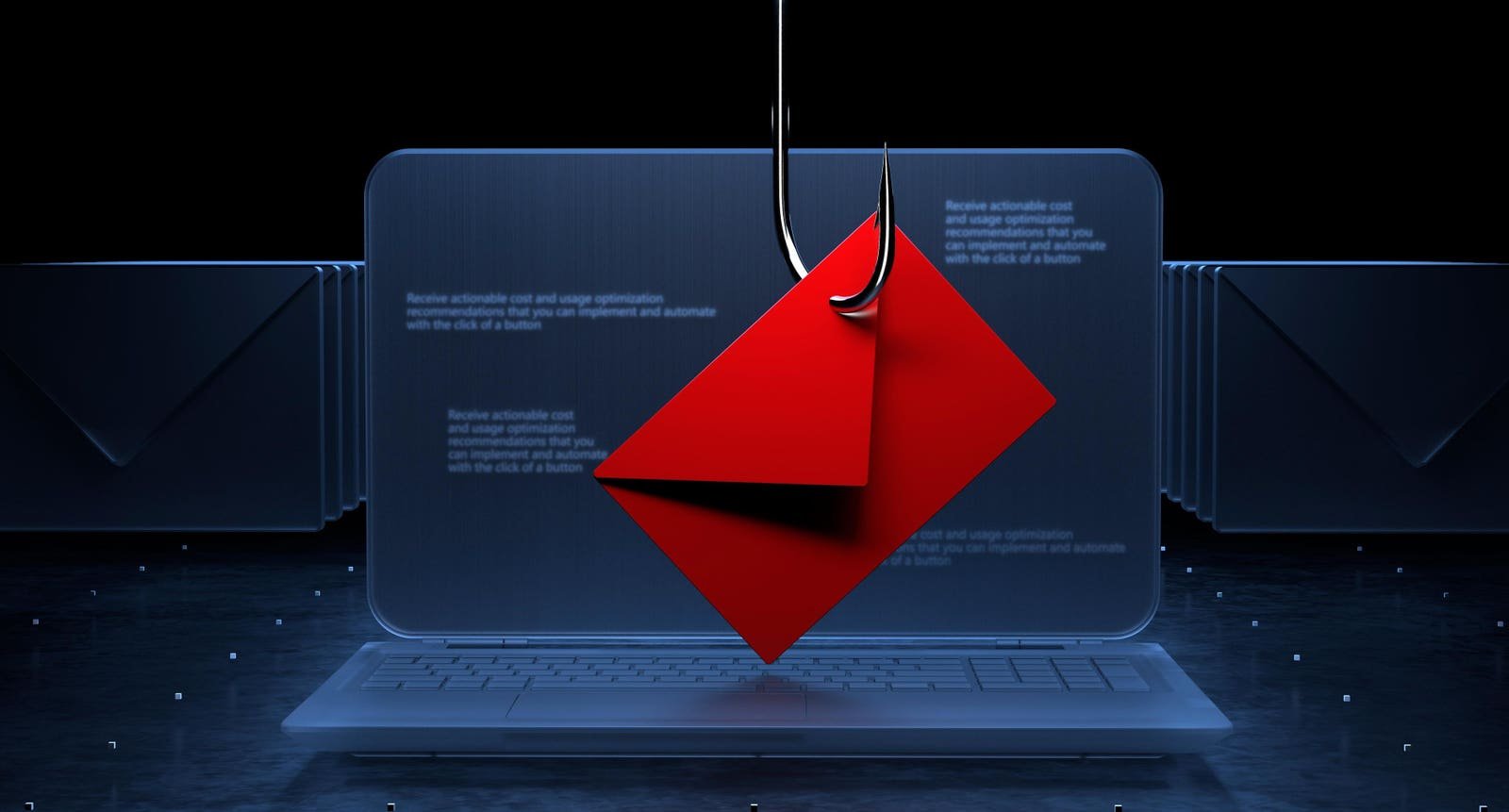

Phishing no longer announces itself with broken grammar or obviously fake emails. Today’s attacks arrive polished, personalized, and perfectly timed—often indistinguishable from the messages people trust every day. Backed by artificial intelligence, real-time testing, and detailed personal data, modern phishing has evolved into a professional deception industry, one that targets human judgment more than computer systems
What Is Phishing?
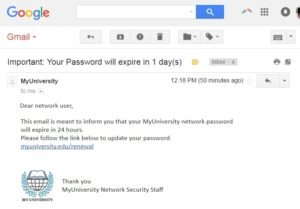
Phishing is a form of cyber fraud in which attackers impersonate trusted individuals, companies, or institutions to trick people into revealing sensitive information such as passwords, OTPs, credit-card numbers, or banking details. These attacks usually arrive through emails, SMS messages, phone calls, or fake websites that look legitimate.
Common examples include:
-
An email claiming to be from your bank stating: “Suspicious activity detected. Verify immediately to avoid account suspension.”
-
A fake GST or income-tax notice asking you to download an attachment.
-
A WhatsApp message from a known contact saying, “Can you urgently send ₹5,000? I’ll explain later.”
- A Google-looking login page where users unknowingly type their email passwords.
Many phishing attempts are visually indistinguishable from legitimate communication, making detection difficult for average users
Types of Phishing
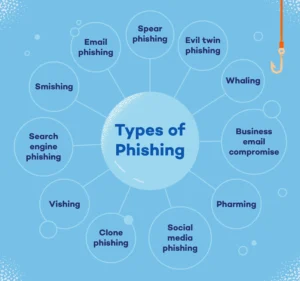
While phishing usually refers to email-based fraud, there are several types of phishing:
- Email Phishing
The most common form. Attackers send bulk emails impersonating banks, payment gateways, OTT platforms, or employers. - Spear Phishing
Personalized attacks using leaked data, LinkedIn profiles, or breached databases. Often used against journalists, executives, lawyers, and government officials. - Whaling
A subtype of spear phishing targeting top executives (CEOs, CFOs) to authorize large financial transfers or share sensitive documents. -
Smishing (SMS/WhatsApp Phishing)
Messages with malicious links disguised as delivery updates, electricity bills, KYC alerts, or wedding invitations. -
Vishing (Voice Phishing)
Fraudsters call victims posing as bank officials, police officers, telecom staff, or cybercrime investigators. -
Clone Phishing
A legitimate email previously received by the victim is duplicated, but the attachment or link is replaced with a malicious one. -
QR Code Phishing
Fraudulent QR codes placed on parking boards, restaurant tables, payment posters, or shared digitally. - Search Engine Phishing
Fake websites promoted via ads on search engines, appearing above genuine results.
How Phishing Works?
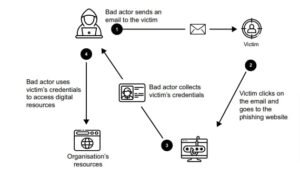
The easiest way to commit a robbery is probably to convince the victims they aren’t being robbed at all. That’s the phishing scammer’s basic model. The following quick points describe how it actually works:
-
Reconnaissance
Attackers gather email addresses, phone numbers, or personal details from data breaches, social media, or public records. -
Message Design
Content is crafted to look authentic—logos, fonts, email signatures, disclaimers, and official language. -
Spoofing & Infrastructure Setup
Fake domains, cloned websites, disposable phone numbers, and mule bank accounts are prepared. -
Triggering Urgency or Emotion
Messages rely on fear (account blocked), greed (refund, prize), authority (police, bank), or empathy (friend in trouble).
New Techniques Of Phishing Attacks In 2026
Phishing has shifted from crude, error-filled scam emails to highly adaptive, data-driven operations that blend social engineering, automation, and real-time manipulation. What once relied on mass emails now increasingly uses personal data, behavioral cues, and contextual timing to deceive even experienced users.
Cybersecurity agencies, including CERT-In, note that modern phishing campaigns are less about volume and more about precision and plausibility.
1. AI-Generated and Context-Aware Phishing
AI-generated phishing uses artificial intelligence to create highly personalized, realistic, and large-scale scam campaigns, making them harder to detect than traditional phishing by mimicking legitimate communication styles, generating deepfake audio/video, and adapting to user behavior, all at unprecedented speeds.
Attackers now use AI tools to:
-
Generate grammatically perfect, professional emails
-
Adapt tone based on the victim’s role (employee, vendor, student)
-
Mimic internal corporate communication styles
Unlike earlier scams, these messages often pass traditional spam filters and appear indistinguishable from legitimate emails.
Example:
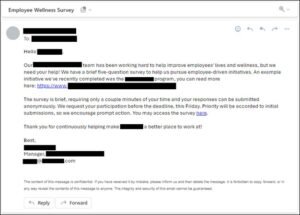
An AI-written email referencing an ongoing project deadline, sent during office hours, asking the recipient to “review updated documents.”
2. Real-Time Phishing (Adversary-in-the-Middle Attacks)
Real-time phishing, otherwise referred to as Man-in-the-Middle (MitM) phishing, is a type of novel phishing attack that tricks a victim into accessing a proxy server (a server that acts as an intermediary) controlled by an attacker. This enables attackers to run far more effective phishing campaigns that can bypass the vast majority of 2FA methods used today In these attacks, victims are directed to a fake login page that sits between them and the real service.
What’s new:
-
Credentials and OTPs are captured and relayed instantly
-
Attackers log in before the victim realizes anything is wrong
-
Even multi-factor authentication can be bypassed
This technique is increasingly used against email accounts, cloud dashboards, and crypto wallets.
3. QR Code–Based Phishing (Quishing)
QR code phishing, or quishing, uses malicious QR codes in emails, physical locations, or messages to trick users into visiting fake websites, downloading malware, or revealing sensitive data like passwords, bypassing traditional email filters by hiding URLs in images, and often leading to credential theft or financial fraud QR codes are now widely used in:
-
Restaurants
-
Parking payments
-
Utility bills
-
Event passes
Attackers exploit this trust by placing malicious QR codes that redirect users to fake login or payment pages.
Why it works:
Users cannot visually inspect a QR code the way they inspect a URL.

4. Deepfake Voice and Video Phishing
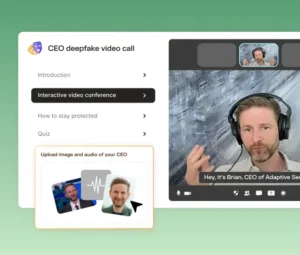
Deepfake voice and video phishing are advanced social engineering attacks where criminals use Artificial Intelligence (AI) to create hyper-realistic synthetic media that mimics the voice, appearance, and mannerisms of trusted individuals, such as a CEO, family member, or government official. Using leaked voice samples and AI voice synthesis, attackers impersonate:
-
Company executives
-
Family members
-
Senior government or police officials
Victims are pressured into transferring money or sharing OTPs during what appears to be a genuine voice or video call.
Common use case:
“Emergency” calls asking for immediate financial help.
5. Search Engine and Ad-Based Phishing
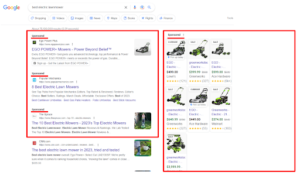
Ad based phishing is a cyberattack where hackers manipulate search engine results (like Google Ads) to display fake ads for legitimate services, tricking users into clicking links that lead to malicious sites designed to steal credentials, financial info, or install malware.
How it tricks users:
-
Fake sites appear above genuine ones in search results
-
URLs look legitimate at a glance
-
Victims assume “top result = trusted”
This method is frequently used for banking, tax, ticket booking, and crypto platforms.
6. MFA Fatigue and Notification Bombing
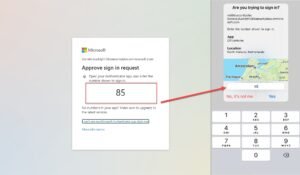
MFA fatigue, also known as MFA bombing or push spamming, is a social engineering cyberattack where an attacker, after obtaining a user’s credentials, repeatedly sends multi-factor authentication (MFA) push notifications to the target’s device. Attackers repeatedly trigger login attempts, flooding the victim with authentication prompts. Eventually, the user:
-
Approves one prompt out of confusion or annoyance
-
Assumes it’s a system error
Once approved, attackers gain access instantly.
7. Business Email Compromise (BEC) 2.0
Business Email Compromise (BEC) is a sophisticated cyberattack where criminals impersonate trusted individuals (like CEOs or vendors) via email to trick employees into making fraudulent wire transfers, revealing sensitive data, or changing payment details, causing massive financial losses by exploiting human trust rather than complex malware
Modern BEC attacks involve:
-
Long-term monitoring of internal email threads
-
Timing messages to align with real invoices or payments
-
Slight changes to bank details or payment instructions
There is no malicious link—just manipulation.

Fake Compliance, KYC, and Policy Updates
Attackers exploit regulatory environments by sending:
-
“Mandatory KYC update” notices
-
“Policy violation” alerts
-
“Account re-verification” requests
These messages exploit fear of penalties, account suspension, or legal action.
Old Mistakes That Still Enable Phishing
Phishing attacks are enabled by a combination of human errors and systemic oversights that allow malicious actors to exploit trust and bypass security measures. The most common mistakes involve failing to recognize warning signs, inadequate security practices, and a lack of proper training.
Common Human Mistakes
- Falling for Urgency and Fear Tactics: Attackers create a false sense of urgency (e.g., “account will be suspended,” “immediate payment required”) to pressure victims into acting quickly without thinking or verifying the request.
- Trusting the Sender’s Appearance: Users often trust a message if it appears to come from a reputable source, such as a bank, government agency, or high-level executive (whaling attacks). They may not closely inspect the actual email address or domain name for subtle misspellings
- Clicking Suspicious Links/Attachments: Clicking on links or opening unexpected attachments is the most common entry point for malware or credential harvesting. Hovering over a link to check the destination URL or refusing to enable macros in unexpected documents are often overlooked precautions.
- Sharing Sensitive Information: Providing sensitive information like passwords, credit card numbers, or MFA codes via email or phone is a major mistake, as legitimate organizations rarely request this information through insecure channels.
- Ignoring Red Flags: Overlooking common phishing indicators such as poor grammar, generic greetings, unusual phrasing, or off-looking design makes it easier for scams to succeed.
- Underestimating AI-Enhanced Threats: Relying solely on outdated red flags like bad grammar is a mistake, as modern AI tools can generate perfectly written and highly personalized phishing messages that are harder to spot.
Organizational and Technical Mistakes
- Lack of Comprehensive Security Training: Inadequate security awareness training for all employees is a significant vulnerability. Training often focuses only on email, ignoring other platforms like SMS (smishing), phone calls (vishing), social media, or live meeting platforms where phishing occurs.
- Insufficient Email Security Controls: Relying solely on basic spam filters is not enough. Advanced email security solutions, URL filtering, and sandboxing for attachments are necessary layers of defense that are often missing.
- Weak Password Practices and No MFA: Using weak or re-used passwords across multiple accounts makes credential stuffing easy for attackers if one account is compromised. Failing to implement Multi-Factor Authentication (MFA), or using vulnerable forms of MFA, leaves accounts exposed.
- Neglecting Software Updates: Outdated operating systems and applications contain known vulnerabilities that attackers can exploit to install malware once a user clicks a malicious link or opens an attachment.
- Poor Incident Response Planning: Not having a clear, documented plan for what to do when a phishing attack occurs can compound the damage.
What Cybersecurity Experts Emphasize
Cybersecurity professionals increasingly agree that phishing has moved beyond being a purely technical threat. Firewalls, spam filters, and endpoint security tools can reduce exposure, but they cannot eliminate phishing because the core vulnerability is human behavior. Modern phishing campaigns are designed not to break systems, but to bypass judgment.
Experts describe today’s phishing landscape as a convergence of psychology, data analytics, and automation, where attackers operate with the same sophistication as legitimate digital businesses.
1. Phishing Is Now a Behavioral Risk, Not Just a Technical One
Security teams observe that most successful phishing incidents occur despite the presence of security software. This is because phishing attacks are engineered to:
-
Arrive at moments of distraction or stress
-
Mimic routine, legitimate interactions
-
Exploit authority, urgency, and trust
From an expert perspective, the user—not the system—is now the primary attack surface.
2. AI Has Raised the Baseline Quality of Scams
Experts highlight that artificial intelligence has eliminated many traditional warning signs of phishing:
-
Poor grammar and awkward language are largely gone
-
Messages are tailored to specific roles, industries, and locations
-
Emails now match corporate tone, formatting, and timing
AI enables attackers to generate hundreds of variations of a message, test which versions work, and refine them almost instantly. As a result, even cautious users may not see obvious red flags.
3. Attackers Test Messages in Real Time and Adapt Quickly
Unlike earlier phishing campaigns that ran unchanged for weeks, modern attacks are continuously optimized. Cybercrime groups now:
-
Track which links are clicked and which are ignored
-
Modify wording, subject lines, or sender names within hours
-
Adjust tactics based on user responses and defenses encountered
Experts note that this rapid adaptation mirrors digital marketing strategies, making phishing campaigns increasingly effective and resilient.
4. The Average User Now Faces Professional-Grade Deception
Security analysts warn that phishing messages today often resemble:
-
Internal corporate emails
-
Legal or compliance notices
-
Customer support interactions
Attackers invest time and resources into building credibility, not volume. This means:
-
Fewer messages, but higher success rates
-
More damage per compromised account
-
Greater difficulty in distinguishing fake from real
In effect, users are no longer dealing with amateur scammers but with organized, specialized fraud networks.
What Experts Consistently Recommend
1. Slow Down Decision-Making
Experts emphasize that speed is the attacker’s greatest ally. Most phishing succeeds because victims act immediately. Deliberately slowing down—even by a minute—often exposes inconsistencies or raises doubts. Pausing breaks the emotional momentum that phishing relies on.
2. Verify Every Unexpected Request
Professionals stress that verification must be independent:
Do not reply to the same message
Do not use contact details provided in the request
Always cross-check through official apps, known phone numbers, or trusted colleagues
Treat Urgency as a Warning Sign
Experts advise users to reverse their instincts:
- If a message creates panic or pressure, it should trigger extra caution, not faster action.
Urgent language is not proof of legitimacy—it is often the strongest indicator of manipulation.
Build Institutional and Household Verification Habits
Security specialists argue that phishing prevention works best when it becomes routine behavior, not a one-time lesson. Recommended practices include:
- Clear verification protocols in workplaces
- Family rules for financial requests and OTP sharing
- Shared understanding that “no urgent request bypasses verification”
What to Do If You Are Already a Victim
Immediate Action (First 10 Minutes)
- Disconnect internet access (Wi-Fi/mobile data)
- Change passwords from a clean device
- Call your bank and request account freeze if needed
Within 1 Hour
Block debit/credit cards, UPI, net banking
Revoke app permissions and unknown installations
Log out of all active sessions
Within 24 Hours
File a complaint on the cybercrime portal www.cybercrime.gov.in
Inform your employer if work accounts are affected
Monitor credit reports and financial statements
How to Collect Evidence
- Screenshot messages, links, fake websites
- Save emails with headers intact
- Record call details and phone numbers
- Preserve transaction receipts and SMS alerts
FAQs Related to Phishing
Is phishing illegal in India?
Yes. It falls under provisions of the IT Act, IPC/BNS, and banking regulations.
Can phishing happen without clicking links?
Yes. Vishing and OTP-based frauds do not require link clicks.
Is HTTPS enough to trust a website?
No. Many phishing sites use HTTPS certificates.
Can phishing lead to identity theft?
Yes. Stolen data can be used to open bank accounts, take loans, or commit further crimes.
Do banks ever ask for OTPs or passwords?
No. Legitimate institutions never ask for such details.
Phishing may have grown more sophisticated, but it is not unstoppable. The same techniques that make modern scams effective—urgency, personalization, and realism—also reveal a central truth emphasized by cybersecurity experts: attackers succeed only when people are rushed, isolated, or unsure. The hopeful reality is that phishing is one of the few cyber threats where human behavior can decisively tip the balance.
Awareness does not require technical expertise; it requires attentiveness, skepticism, and the confidence to question what feels “off.”