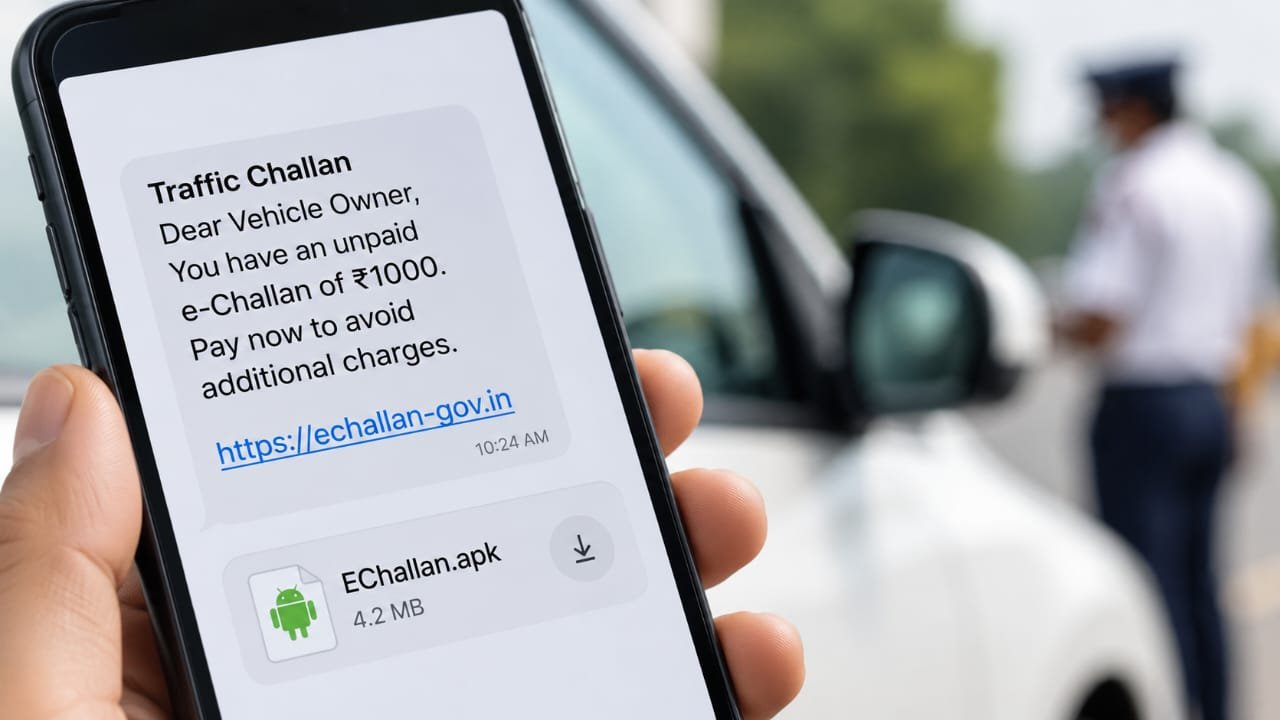
A fake traffic fine notification can expose an Android phone to malware capable of stealing banking information, reading sensitive messages and facilitating unauthorised financial transactions. The e-challan scam exploits people’s fear of unpaid traffic penalties by sending fraudulent SMS or WhatsApp messages disguised as official government notices.
India’s Computer Emergency Response Team (CERT-In) warned on March 17, 2026, about a sophisticated malware campaign impersonating Regional Transport Offices (RTOs) and government e-challan services.
The malicious files often carry convincing names such as `RTO Challan.apk`, `RTO E Challan.apk` or `MParivahan.apk`, making them appear connected to legitimate transport services.
FCRF’s Chief AI Officer Certification Returns on November 14 to Prepare Future AI Leaders
How Does the E-Challan Scam Work
The fraud begins with a message claiming that the recipient has violated traffic rules and must pay a pending fine.
The notification may include a vehicle registration number, payment demand or warning about penalties. Some messages contain links to websites resembling official transport department portals.
Instead of displaying genuine challan details, these websites may ask visitors to download an application to view their fine or complete verification.
An APK, or Android Package Kit, is the file format used to install Android applications. APK files are not inherently malicious, but criminals exploit this installation mechanism to distribute harmful software outside trusted app stores.
The fraudulent application may imitate the government’s mParivahan service while secretly performing unauthorised activities.
How Can a Fake E-Challan APK Infect Your Phone?
CERT-In’s March 2026 advisory describes a multi-stage malware operation.
After installation, the initial application may prompt users to install an additional update. That update can deploy the actual malicious component, which may remain hidden from the ordinary application list.
The malware can request permission to access SMS messages, phone calls, background services and VPN connections.
Depending on its capabilities and permissions, malicious software may intercept banking alerts, expose sensitive information or support unauthorised transactions.
Simply receiving a message does not infect a phone. Opening a suspicious link is risky, particularly if it leads to credential theft or a malicious download, but it does not necessarily mean malware has been installed. The risk becomes substantially greater when users install untrusted software and grant dangerous permissions.
How Serious Is the Fake Traffic Challan Fraud?
The financial consequences can be substantial.
In August 2026, the Ministry of Home Affairs informed Parliament that the National Crime Records Bureau did not maintain separate statistics on fake e-challan cases, recoveries or amounts stolen. Therefore, no verified nationwide loss figure specific to this scam is available.
How Can You Identify and Verify a Fake E-Challan?
Suspicious challan messages commonly use urgent payment demands, unfamiliar website addresses, shortened links or APK attachments.
A message may appear convincing even when it includes correct vehicle information.
The safest approach is to verify the fine independently through the government’s official eChallan portal.
Enter the official website address yourself, check the challan using the available vehicle or challan details, and use the portal’s authorised payment process.
Do not rely on a payment link merely because the message displays a government logo.
The Ministry of Road Transport and Highways warns users against fraudulent websites and applications impersonating its services.
What Should You Do After Installing a Fake Challan APK?
If you installed a suspicious application, disconnect mobile data and Wi-Fi immediately.
Remove the fraudulent application and inspect the phone for other unfamiliar apps. Run a trusted security scan and install available Android security updates.
Because some malware can hide additional components, uninstalling the visible application may not completely eliminate the threat. Seek professional assistance or consider a factory reset after securely preserving essential data if compromise is suspected.
Change banking passwords, email credentials and UPI PINs using another trusted device. Contact your bank immediately if financial information may have been exposed.
If money has been transferred without authorisation, call 1930 and register a complaint through India’s National Cyber Crime Reporting Portal
Preserve the fraudulent message, sender’s number, transaction references and screenshots as evidence.
The420.in previously reported a case in Lucknow involving a fake traffic challan APK. The incident highlights how fraudsters use bogus traffic fine notices to trick victims into installing malicious applications and potentially exposing their banking information. Lucknow Fake E-Challan APK Scam
Frequently Asked Questions About E-Challan Scams
1. Can clicking a fake challan link hack my phone?
Clicking alone does not always cause infection. However, malicious websites can steal information, prompt dangerous downloads or exploit device vulnerabilities.
2. Is every e-challan message fraudulent?
No. Genuine electronic traffic notices exist. Always verify outstanding fines independently through official transport department services.
3. Can an APK steal money without my OTP?
Certain malware can intercept SMS messages or misuse device permissions. Whether it can facilitate a transaction depends on the malware and banking security controls.
4. Can iPhone users face the same scam?
Yes. iPhone users can encounter phishing websites and fraudulent payment requests, although ordinary Android APK files cannot be installed directly on iOS.
5. Can I report a suspicious link without losing money?
Yes. I4C’s accepts suspicious URLs, phone numbers and other identifiers.
6. Will deleting the fraudulent APK make my phone safe?
Not necessarily. Additional malicious components or compromised credentials may remain. A security assessment and credential changes may still be necessary.
The420 Insight: What Does This Mean for Vehicle Owners?
Fake e-challan messages turn an ordinary government service into a tool for financial fraud. The most effective protection is to separate challan verification from unsolicited messages.
Never install an APK received through a traffic-fine notification. Open the official eChallan website independently, verify the alleged violation and report suspicious messages before more users become victims.
About the author — Ayesha Aayat writes on cybercrime, digital safety, and emerging online threats. Her work focuses on public awareness, legal clarity, and technology-driven risks.
Follow for daily updates on cybercrime, corporate fraud, DFIR, hacking, investigations, and digital forensics